A calculator that
understands your business
一个算得懂
业务账的计算器

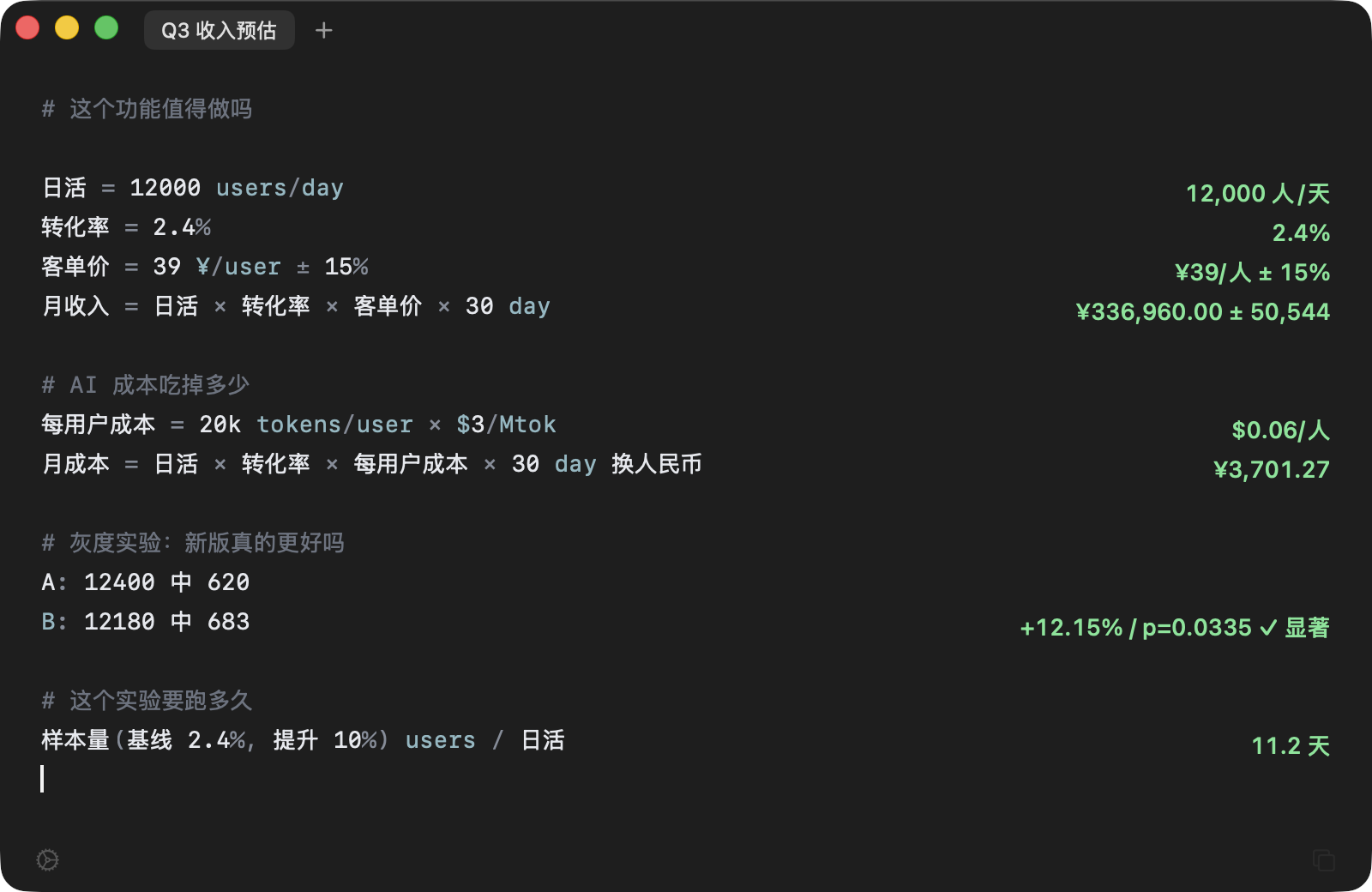
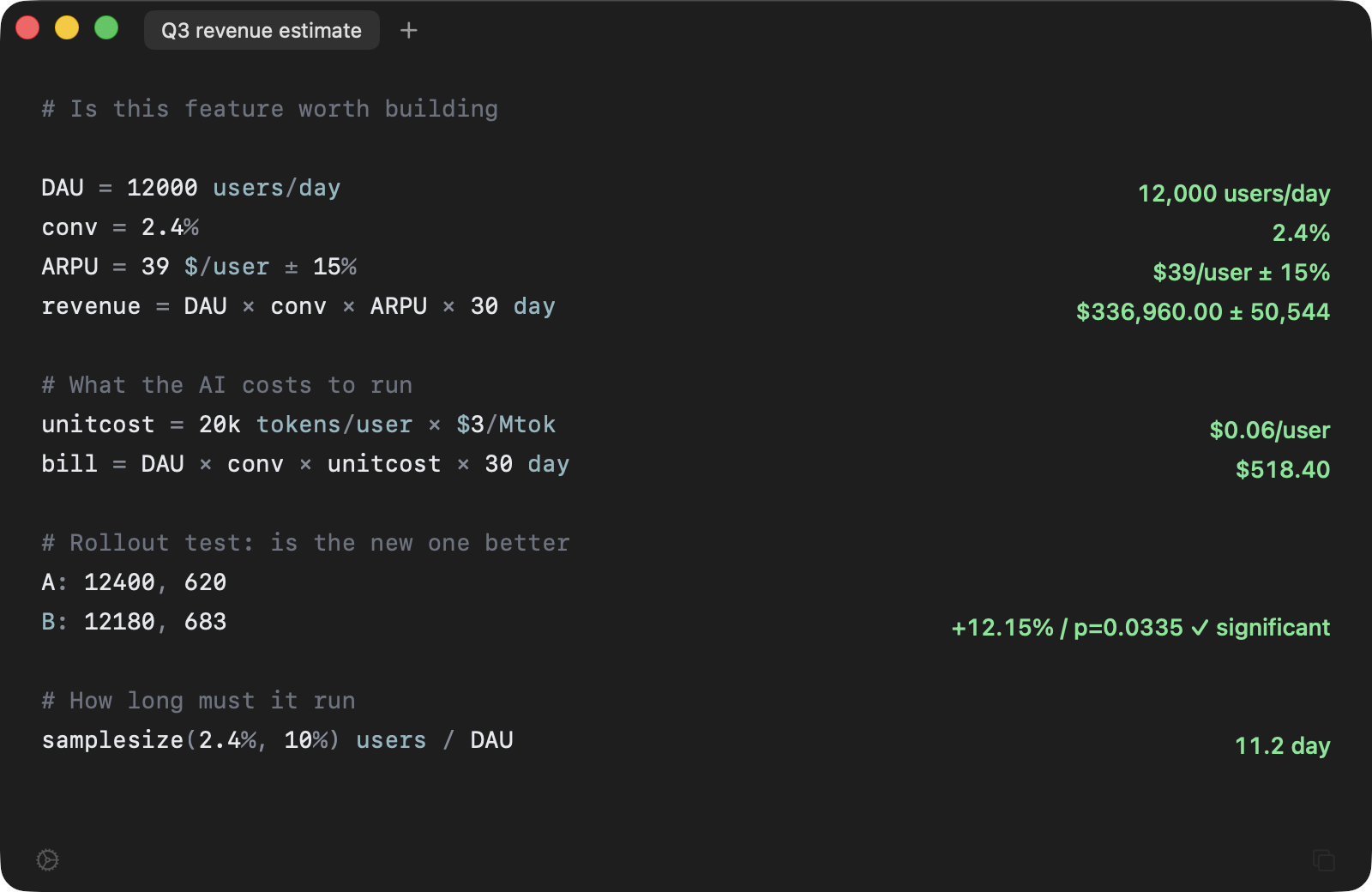
Estimate revenue, price out an AI feature, read an A/B result — one line in, one answer out. It knows what users/day and $/user mean, runs the significance test for you, and carries your error bars all the way to the bottom line. 估收入、算 AI 成本、看 A/B 实验结果——写一行,右边出一个答案。 它认识「人/天」「元/人」这些业务单位,会自己算显著性, 也会把你的误差范围一路带到结论。

macOS 14 or later · Signed and notarized · 1.7 MB macOS 14 或更新版本 · 已签名公证 · 1.7 MB

Napkin: expressions on the left, results on the right — unit derivation, AI cost, A/B significance. Napkin 界面:左侧算式,右侧结果——单位推导、AI 成本、A/B 显著性。

Space to call it up, Esc to put it away — focus goes back to where you were Space 呼出,Esc 收起——焦点回到你刚才那个窗口

Three mistakes it catches它会拦下三种错

Every other calculator lets all three through without a word. 这三种错,Excel 和普通计算器都会安静地放过去。

Adding headcount to money把人数和金额加在一起

Excel hands you 150, and that number ends up in a deck. Napkin refuses, and tells you what the two units actually were. Excel 会给你 150,然后这个数被写进汇报。Napkin 直接拒绝, 并告诉你两边的单位分别是什么。

100 users + $50 can't add users and USD — different units
100 users + ¥50 users 和 CNY 量纲不同,不能相加

Mistaking noise for growth把噪声当成了增长

Conversion is up 24% — looks shippable. But at a thousand users per arm there's a 24% chance it's luck. Napkin just says not significant. 新版转化率高了 24%,看着该上线了。但每组只有一千人, 这个差异有 24% 的概率纯属偶然。Napkin 会直接说「不显著」。

A: 1000, 50 B: 1000, 62 +24.00% · p=0.2432 ✗ not significant
A: 1000 中 50 B: 1000 中 62 +24.00% · p=0.2432 ✗ 不显著

Treating a guess as a fact把猜的数当成了准的数

ARPU is "about 39". Somehow the monthly revenue comes out to the cent. Write the range and Napkin tells you how far off it can be. 客单价「大概 39 块」,算出来的月收入却精确到分。 写下浮动范围,Napkin 会告诉你结论能差多少。

ARPU = 39 $/user ± 15% DAU × ARPU × 30 day $14,040,000 ± 2,106,000
客单价 = 39 ¥/user ± 15% 日活 × 客单价 × 30 day ¥14,040,000 ± 2,106,000

Everything you'd reach for常用的都在

Left is what you type. Right is what it computes. 左边是你写的,右边是它算的。

Units follow the math单位自己跟着算
Write DAU × ARPU × 30 day and it knows the answer is money, not headcount. Units carry through the whole expression on their own. 日活 × 客单价 × 30 day,它知道结果是钱,不是人数。 单位跟着算式一路推导,不用自己盯。
What an AI feature will cost算 AI 功能要烧多少钱
2k tokens/user × $3/Mtok gives cost per user; multiply by DAU for the monthly bill. You supply the price — a built-in table would go stale, and a stale price table is worse than none. 2k tokens/user × $3/Mtok 得到每用户成本,再乘日活就是月账单。 模型价格自己填——内置的价格表过期比没有更危险。
How long the test has to run这个实验要跑几天
Sample size for the lift you care about, divided by daily traffic: DAU = 12k users/day,然后 samplesize(2.4%, 10%) users / DAU11.2 day 检出目标提升需要多少样本,除以日活就是天数: 样本量(2.4%, 10%) users / 日活11.2 天
Points versus percent涨了 0.61 个点还是涨了 12%
Conversion from 5% to 5.61% is both "+0.61 points" and "+12%". 5% → 5.61% gives you both, so you don't quote the wrong one. 转化率从 5% 到 5.61%,两种说法都对但差别很大。 5% → 5.61% 两个数一起给,汇报时不会说错。
Name your assumptions给数字起名字
Write revenue = DAU × ARPU × 30 instead of 12000×39×30. Change one assumption and the rest recomputes — and it still makes sense three days later. 月收入 = 日活 × 客单价 × 30 而不是 12000×39×30。 改一个假设整段自动重算,三天后回来还看得懂。
Paste it somewhere else算完贴给别人看
A copies the whole draft with results aligned; M copies it as a Markdown table. A 复制整份草稿,算式和结果对齐排好; M 复制成 Markdown 表格。
Money that adds up钱算到分不出错
0.1 + 0.2 is 0.3. Most calculators give you 0.30000000000000004 — floating point and money don't mix. 0.1 + 0.2 就是 0.3。多数计算器在这里会给你 0.30000000000000004——用浮点数算钱迟早出事。
Full syntax reference → 完整语法参考 →

Next estimate, skip the spreadsheet下次估收入,别开 Excel 了

Download for macOS下载 macOS 版

macOS 14 or later · Signed and notarized macOS 14 或更新版本 · 已签名公证